
they already solved that
Ok, i decided to come back to this and it says the sign in button says error on line 10 in the mouseclick script, there is no line 10, it just says
project.SignIn();
Here’s The Frame code
project.passwords =
[
“uvio”,“systematix2”
];
stop();
project.Confirmed = function(){
textbox2.box.runScript(‘unload’);
playSound(“logon.wav”)
alert(“Welcome!”)
};
project.SignIn = function(){
if(project.passwords.indexOf(project.password)!==-1){
project.Confirmed();
}else{
alert(“Wrong Login Info”);
}
};
thatd be cool if you encrypted it
That’s because project.SignIn() is a function. The error is in line 10, in the script where the function is defined (the default script).
Nothing looks wrong with the code, it might be a reference error.
What does the error in the console say?
How do i identify what’s related to the issue?
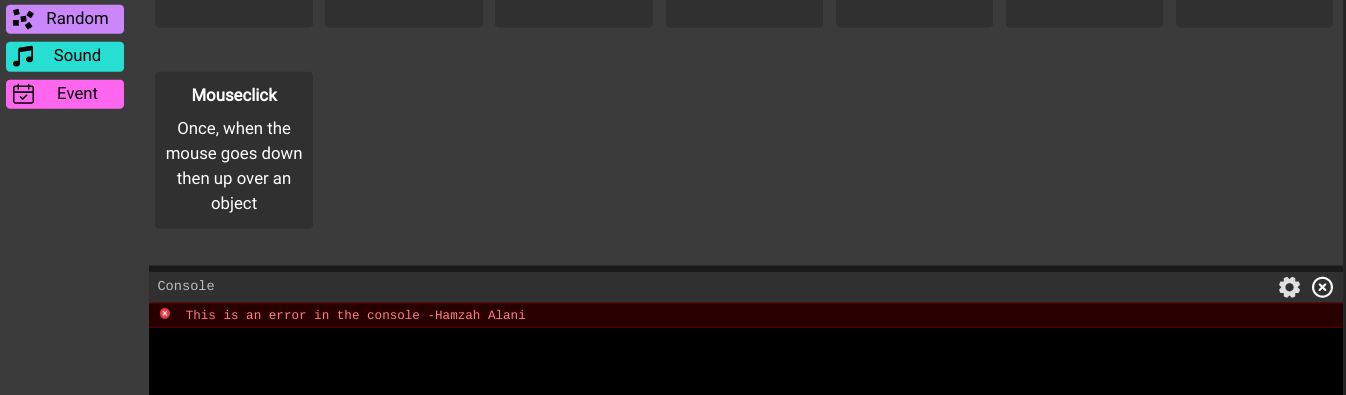

@Hamzah_Alani Here’s the log
@Luxapodular Are you aware of what could cause this in .3?
also, it only happens when the correct pswd is entered and in both web and desktop versions
Then the problem is here:
Try playing the project without one of these lines to find the issue
nvm figured it out
1 Like
I need help with this aswell. I’m sorry that this is a kinda old topic but i wanna make a pin system where different pins go to different frames
I am having the same issue but, my error points to this line which i am assuming is a typo because there is no parentElement on any of the TextInput fields but, inputElement and parentClip.
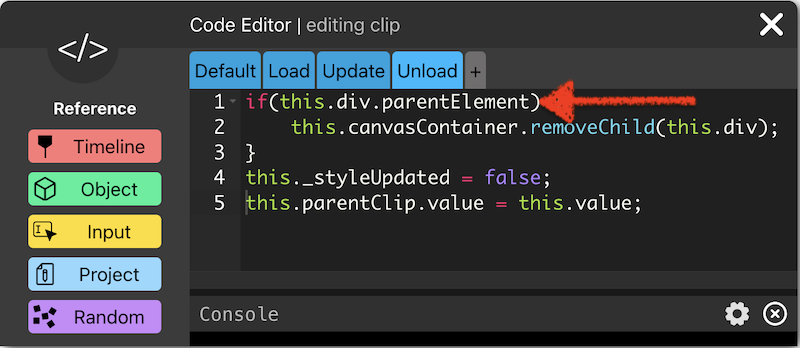
I finally got my login system working and in case you are planning to create one, below is the working code for the Text Input field.
To get this to work on both the Username and Password fields, edit one Text Input field then, copy or duplicate it to avoid doing the same thing twice.
Paste the following code in the correct Text Input fields and test.
//-----------------------//DEFAULT PANE
this.value = “”;
// Attach this to the absolute position of the PARENT.
this.parentClip.getAbsPos = () => {
return this.paper.view.projectToView(new this.paper.Point(
this.parentClip.view.group.bounds.left,
this.parentClip.view.group.bounds.top
));
}
this.getAbsSize = () => {
return {
width: this.view.group.bounds.width * this.paper.view.zoom,
height: this.view.group.bounds.height * this.paper.view.zoom,
}
}
this.updateDivPosition = () => {
var pos = this.parentClip.getAbsPos(); // Connect to parentClip’s position.
var size = this.getAbsSize();
this.div.style.position = ‘absolute’;
this.div.style.left = pos.x + ‘px’;
this.div.style.top = pos.y + ‘px’;
this.div.style.width = size.width + ‘px’;
this.div.style.height = size.height + ‘px’;
this.div.style.backgroundColor = ‘white’;
}
this.paper = this.view.paper;
this.div = document.createElement(‘div’);
this.canvasContainer = this.project.view._canvasContainer;
this.canvasContainer.appendChild(this.div);
//-----------------------LOAD PANE
/* TextInput code */
this._inputFunction = (val) => {
}
// Adds an on change event to the text input. This function will be sent the text string
// within the input.
this.setOnChange = (fn) => {
this._inputFunction = fn;
}
this.parentClip.setOnChange = this.setOnChange;
this.onInputChange = (value) => {
this.value = value;
this._inputFunction && this._inputFunction(value);
}
// Update styling of the div.
this.inputElem = document.createElement(‘input’);
this.inputElem.style.width = ‘100%’;
this.inputElem.style.height = ‘100%’;
this.inputElem.oninput = (e) => {
this.onInputChange(e.target.value)
}
this.div.appendChild(this.inputElem);
//-----------------------UPDATE PANE
this.updateDivPosition();
if (this.textStyle && !this._styleUpdated) {
let style = this.textStyle._json[1];
if (style) {
this.inputElem.style.fontWeight = style.fontWeight + “”;
this.inputElem.style.fontSize = style.fontSize + “”;
this.inputElem.style.fontFamily = style.fontFamily;
this._styleUpdated = true;
}
}
this.parentClip.value = this.value;
this.parentClip.text = this.value; // sync value to text
//-----------------------UNLOAD PANE
if (this.div && this.div.parentNode) {
this.div.parentNode.removeChild(this.div);
}
this._styleUpdated = false;
this.parentClip.value = this.value;
//---------------------------------------------LOGIN BUTTON
console.log(“Login clicked”);
let username = usernameInput.value; // now correctly reads input
let password = passwordInput.value; // now correctly reads input
console.log(“Entered username:”, username);
console.log(“Entered password:”, password);
if (username === project.correctUser && password === project.generatedPass) {
gotoAndStop(“findMe”);
} else if (username !== project.correctUser) {
gotoAndStop(“wrongUser”);
} else {
gotoAndStop(“wrongPass”);
}
Goodluck…