Candlestick black screen

Pretty simple issue.
Im working on an animation in candlestick, using the mp4 accessibility for a reference.

But when I export it.
It’s nothing but a black screen with sounds.
I found a previous post with the same issue, which seems to be unresolved as of now.

I assume this is a candlestick specific issue, which wasn’t confirmed or denied in the last post.

The site also crashes when I attempt to save a .wick file.

Their is no code.
Removing the mp4 does not solve the issue.
I have made sure the background isn’t transparent.
I cannot copy it to normal wickeditor as it doesn’t register the same, so it can’t read that theirs anything In my clipboard.

Edit because forgot to mention: this is not an issue with .gif exports. Just .mp4
The MP4 Export feature in Wick is buggy and old. It uses a web version of FFmpeg (a command line tool to manipulate video and audio files) which is old. Due to the old codec, some newer (or even older) video players may have issues opening these files.

i dont have a problem with this so maybe its just you? how much frames was the anim?

Was about 40 at the time the issue first happened but seems to happen regardless.

40 frames? it should only lag at like 500 or more DANG!! i think its a you problem…

Do you know how much RAM do you have on your device?

I have 4 ram and I don’t have that problam

just clarifying is this mp4 import or export? (i know that the problem is visible when you export, but if you import an mp4 and then export and something goes wrong, that’s a slightly different issue)

if it’s purely an export thing, i can say that wick/candlestick’s exported mp4s are not the most compatible. apps like discord tend to struggle with them. if you take your exported mp4 and use an online file converter, it usually repairs the video. (you can probably even just convert mp4 to mp4)

if it has to do with importing mp4s, hamzah will probably be the most well-suited to tackle that, though i know he’s super busy with school so it’ll likely have to wait.

does it load the autosave correctly? if so, i can try to figure out how you can extract the autosave data…

1 Like

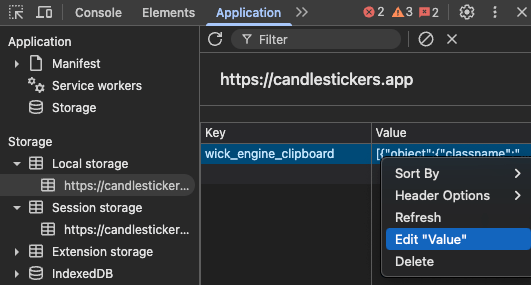
if it helps with diagnosis, you can try the crazy roundabout solution of… modifying local storage.

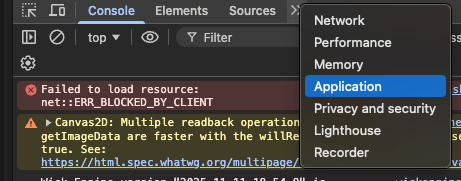
you can open candlestick dev tools, go to Application --> first option in Local storage, then right click the stuff in the Value column and Edit “Value”. copy all that, go to wick, navigate to the same place, and paste it there.

Screenshot 2025-11-29 at 9.37.46 PM
Screenshot 2025-11-29 at 9.40.16 PM

1 Like

It’s the export that’s the issue, however the import is why I’m using candlestick over the normal editor. When I export as an mp4, no matter what I open it with, the screen is completely black. The autosaves do work correctly

if you throw it into a file converter does it fix it?

i would ask for the wick file but… it doesn’t sound like that will be possible.

though if you want to try, you can send me the broken video file and i can try to hack it into a usable state.