Looking to extend my Luke Tools and was hoping to able to add assets to the library programatically.
project.assetLibrary.addAsset(asset);
Is this a thing?

Looking to extend my Luke Tools and was hoping to able to add assets to the library programatically.
project.assetLibrary.addAsset(asset);
Is this a thing?
i was able to get this working, but only inside the console, not inside wick’s code editor, and i’m not exactly sure why.
let asset = new window.Wick.ImageAsset({
    filename: "pfp.png",
    src: "https://forum.wickeditor.com/user_avatar/forum.wickeditor.com/baronawc/32/14116_2.png",
});

project.addAsset(asset);
the asset will look pretty normal in the library, but attempting to add the image to the canvas will fail, probably because i’m missing something important while trying to add the asset.
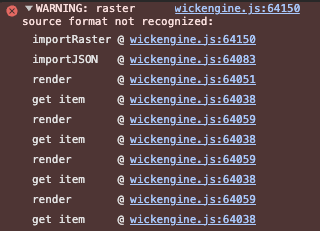
not really sure what it’s missing, but hopefully this can at least get you moving in the right direction.
At least that is a lead… Thanks heaps!
This is what I got to work using my bridging tool.
<!doctype html>
  Luke Tools - Multi Image Sequence Importer (Each Image as Clip)

    body { margin: 0; padding: 14px; background: #222; color: #eaeaea; font-family: Arial, sans-serif; }
    .panel { border: 1px solid #444; background: rgba(0,0,0,0.35); border-radius: 8px; padding: 12px; display: flex; flex-direction: column; gap: 10px; }
    .title { font-size: 12px; color: #9aa; text-transform: uppercase; border-bottom: 1px solid #444; padding-bottom: 5px; }
    input[type="file"] { width: 100%; padding: 10px; background: #1a1a1a; color: #aaa; border: 1px dashed #555; border-radius: 6px; }
    button { width: 100%; padding: 12px; border: none; border-radius: 6px; background: #21b26b; color: #fff; font-weight: bold; cursor: pointer; }
    button:disabled { opacity: 0.55; cursor: default; }
    #consoleLog { background: #111; border: 1px solid #333; border-radius: 6px; padding: 10px; font-family: monospace; font-size: 11px; color: #0f0; height: 220px; overflow-y: auto; white-space: pre-wrap; }
    .settings { font-size: 11px; color: #cfcfcf; display: flex; justify-content: space-between; gap: 10px; align-items: center; flex-wrap: wrap; }
    .settings input[type="number"] { width: 70px; background:#111; color:white; border:1px solid #444; border-radius: 4px; padding: 4px 6px; }
    .chk { display:flex; align-items:center; gap:8px; }
    .hint { font-size: 11px; color: #aaa; opacity: 0.9; line-height: 1.35; }
    .row { display:flex; gap:10px; }
    .row button { flex: 1; }


    Sequence Importer (New Frame per Image) + Wrap Each As Clip
<input type="file" id="desktopFiles" accept="image/*" multiple>

<div class="settings">
  <span>Start Frame: <input type="number" id="startFrame" value="1" min="1"></span>

  <span class="chk">
    <input type="checkbox" id="wrapAsClip" checked>
    <label for="wrapAsClip">Wrap each PNG as its own Clip</label>
  </span>

  <span class="chk">
    <input type="checkbox" id="nameClipFromFile" checked>
    <label for="nameClipFromFile">Name clip from filename</label>
  </span>

  <span class="chk">
    <input type="checkbox" id="clearFramesInRange" checked>
    <label for="clearFramesInRange">Clear existing frame contents in range</label>
  </span>

  <span class="chk">
    <input type="checkbox" id="insertBlankFrames" checked>
    <label for="insertBlankFrames">Ensure blank frame at each position</label>
  </span>
</div>

<div class="row">
  <button id="importBtn">Build Animation Sequence</button>
  <button id="clearLogBtn" style="background:#444;">Clear Log</button>
</div>

<div class="hint">
  Imports each PNG, places it on its own frame, optionally converts that instance into a Clip, and forces UI refresh so the stage updates immediately.<br>
  Also patches missing project.markAsModified in some builds to prevent errors.
</div>

<div id="consoleLog">Ready.</div>
I actually know why… The project that you access in the code editor is actually just the project’s root object, with some project-exclusive functions attached. I have no idea why it is that way, but I theorize it’s just to make the private functions harder to access.
Hey Noobfield.
I got this to work and then some. I can load graphics directlty to the editor and convert them to clips. It takes seconds. I’m releasing a video and some handy apps later in this New Year (Happy New Year BTW) 
Thanks for your jelp it pointed me in the right direction.
Luke