
Please give me a example on how to make physics, For example collision physics as seen In here
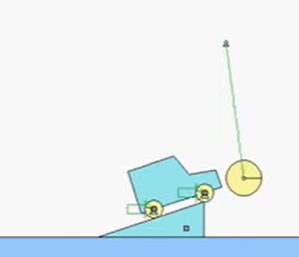
What I’m trying to say Is that How do I make collision physics?
And No I’m not doing Verlet Integration.
If it is the only Type of Physics I could Do in the Wick Editor Then fine.
But I do Want to find out how to do collision physics Since I already Got gravity.
Note: How I got gravity was from The post “I dont believe in gravity anymore”.
2D physics is, uh, really hard to make… i don’t think anyone here has made true physics in any form. as a physics student right now, there are so many things to take into account that it would be really hard to replicate.
i suppose you can look online (youtube probably) for guides about making 2D physics from scratch.
1 Like
I want to know a step by step on how to do something like the Forum page Up there.
I need one of the users who knows how to do 2D physics step by step.
I hope Someone Comes.
Ok, I’ve been on break so I haven’t really been going on the forum at all, but here’s the main rules my simulation follows.
All objects are circles
If two objects’ distances are < obj1.radius + obj2.radius, they have collided
Basically, make them “point towards” each other and move 1/2 of their combined radius backwards
Velocity is calculated by taking current pos - previous pos (this is what verlet integration is)
that’s basically it.
1 Like
okay, so i did some digging and you can actually add matter.js into wick editor! i used candlestick because why not, and it’s actually really (kinda) easy. there’s some kinks to work out, but it’s not that hard. matter.js.wick (6.8 KB)
here’s my wick file if anyones interested. oh and html export won’t work until i find a way to fix this weird thing that happens.
1 Like
oh and this wont work until you got to the first frame’s default and move project.colliders = [] to the first line. should have fixed that lol
@monocle_enjoyer you just responded to a post from 2024! But it’s ok, I didn’t fully know that people were still thinking about this.
Also, it’s good to point out that you would want to use some kind of worker (new Worker("an URI")), in which the Verlet math would be done. This method essentially simplifies the vernet math to simple, async (doesn’t block the already slow wick) operation, which would look like this:
const phyWorker = this.phyWorker = new Worker('vworkerlet.js'); // makes a worker, which isn't connected to the creator.

let phyWorldCurrent = [{r: 10, x: 0, y: 20, m: 50}], phyWorldLast = [{r: 10, x: 5, y: 25, m: 50}];

phyWorker.postMessage({current: phyWorldCurrent, last: phyWorldLast});

phyWorker.onmessage = function(msg) {
  const data = msg.data;
  if(msg.data?.last === phyWorldCurrent && msg.data.current !== undefined) {
    phyWorldLast = phyWorldCurrent;
    phyWorldCurrent = msg.current;
  }
}

// unload
this.phyWorker.terminate();
can you explain what that does like i’m a five year old? that’s basically dark magic to me. oh, and i made a better version in which html export works. physics test advanced.html (2.2 MB). it wont work if you double click it, you have to use VScode live server or some other thing like that.
Wick slow. JS Physics slow. Worker is another room. Other room is faster. JS Physics talks to the worker. JS Physics fast(er).
wait, so wick is slow? at 60 fps? what kind of optimization is that worker doing?
- Yes, wick IS slow. It uses a lot of memory for things like paths, clips, assets and more. Obviously this only becomes a problem when creating lots of clones.
- Wick can run at 60 FPS (closed rate), but this is done with
setInterval, making it so Wick will update, even when it’s not the main tab. - The worker essentially is freeing the main JS thread to run Wick and your primary game logic, so the physics implementation can be slow, ineffective, and bad, but not cause any problems to your game’s FPS.
2 Likes