Issue with functions (solved)

Essentially, I’m trying to move my AI for some enemies into a function on the frame, so the enemy clones can just call back to that rather than have their own entire ai running, which has caused lag issues.

Though for some reason, I can’t get it to recognize any function.

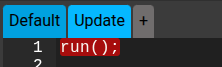
When is just out the function as “run();”
It says that it isn’t defined when It is in default of the frame.

So I tried to put *project.run();" which does allow it to recognize it as a function, but it recognizes the whole thing as a function rather than just “run”, leading to it saying it’s undefined.

Not sure how to get it to call back to the function on default.

Screenshot 2026-01-08 12.30.12 PM Screenshot 2026-01-08 12.39.25 PM

hey @Leaf , can you post your .wick project file in this thread? I can take a peek and see what’s going on

Easy. The problem is that variables created in events (using var, const, let or function) are restrained to the event (for safety reasons). You can use this or project to define the function, either specifically for your Clip, or for the entire project.

project.magnitudeOfVec2 = function(x,y) {
  return Math.sqrt(x**2 + y**2);
}

this.magnitude = function() {
  return Math.sqrt(this.x**2 + this.y**2);
}

if(this.magnitude() > 50) this.remove();
if(project.magnitudeOfVec2(bullet.x, bullet.y) > 50) bullet.remove();
1 Like

Oh, hay sorry for the lack of reply. Never got the notification for some reason. I don’t think I can put the wick file here. It’s being weird.

Well, I’m trying to get essentially one function for the whole thing. That each clone can call to and essentially run on themselves rather than having their own ton of Ai.
Is that even possible though? Like. How would I be able to make a function that objects can run on themselves letting them use “this.” Idk if I’m explaining it well. I did manage to get them to call a function, but it won’t run anything with “this.”

Issues like that up pretty often when it comes to the this keyword. It’s a pretty confusing part of the Javascript language IMO.

A possible solution is to pass in this from your clone as a parameter to your AI function. Here’s what that could look like:

Clone’s code

project.runAIStuff(this);

AI function (somewhere else in the project)

project.runAIStuff = function ( clone ) {
    // Use "clone" the same way you would use "this"
    clone.x = 100
    clony.y = 200
    clone.rotation ++;
    // etc, etc
}

Now you have a self-contained function that can be applied to any Clip throughout your whole project :smiley:

1 Like

This is exactly what I was looking for! Works perfectly now. Didn’t clean up the lag as much as I thought but definitely helped. Thanks for the explanation. I don’t use functions much so I had no clue what I was doing. Now I’ve lowered the amount of lines each clone has from around 50 to just 4.

1 Like