
Has this bug been reported already?
not to my knowledge
Describe the bug
two things
- pathcursor spline guides get stuck on visible and renders in the final product when exporting
(animation sorta long, but you can see the guides at the end on the legs)

(easy to avoid, just got to make sure the lines are gone before exporting, but still annoying if not noticed in time)
The pathcursor spline guides get stuck and stay visible after using pathcursor tool, once exported, they get rendered. (ive only rendered them with gifs, dont know about videos, images, or games)
- line spline angle and intensity changes
(these should be the same lines, but after editing frame, the one the right changes its spline intensity)
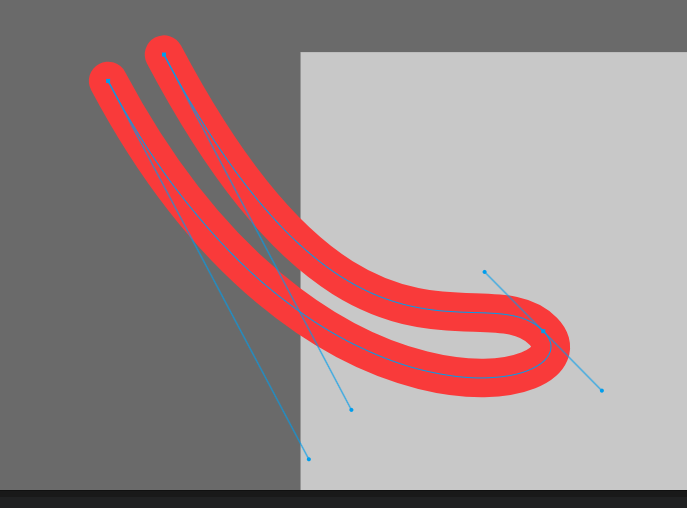
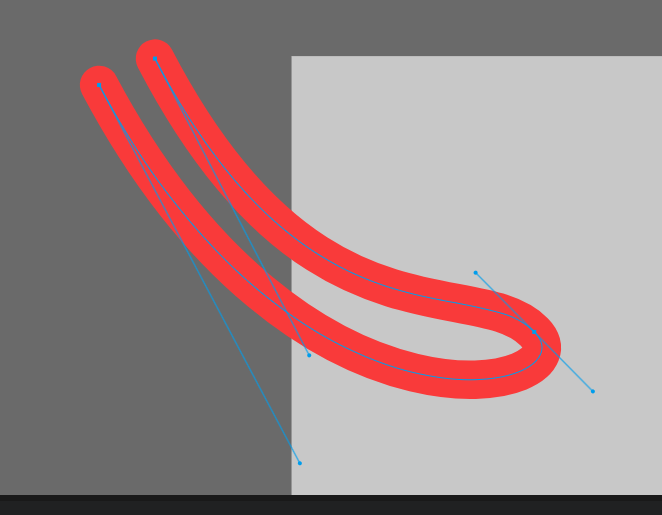
The line changes seem to happen after cut/copypasting and cutting(not ctrl+x, but splitting the frame), the frame will revert the line angles and intensities back to the last line angles and intensities it was prior
moving/adding/removing a line point will make the glitch not occur
if ctrl+z after cutpasting or cutting the frame, it will keep the wrong line state
(sorta reminds of the tweens messing up in a similar way, caused by frame editing)
_
This might be a niche problem, idk how many people use the lines to this extent, but i started using them a little bit more recently to experiment and get nice clean lines that i can edit quickly and effectively without messing with its thickness and position. Trying to make an animation when i notice that the lines were messing up and not aligned anymore. The animation looked smooth and clean before, but then it looked bumpy and jittery. Its pretty annoying and really is getting in my way. Lost some progress to the cutting frame and ctrl+z thing too, had to do it a few times until i realized what was happening. Dont know how to avoid it, might just have to be very careful.