
LukeTools will stay an addon - Not a fork

I have come to the conclusion, after realising how hard it is to iterate forks and share updates, that LukeTools and the Bridge are best shared as an addon wickobject. If you use the tool, please note that not all scripts function perfectly yet, but they will evolve over time. Updates will occur without anyone needing to download the tool more than once.
You can get the tool here:
[image]

LukeTools.zip (39.8 KB)

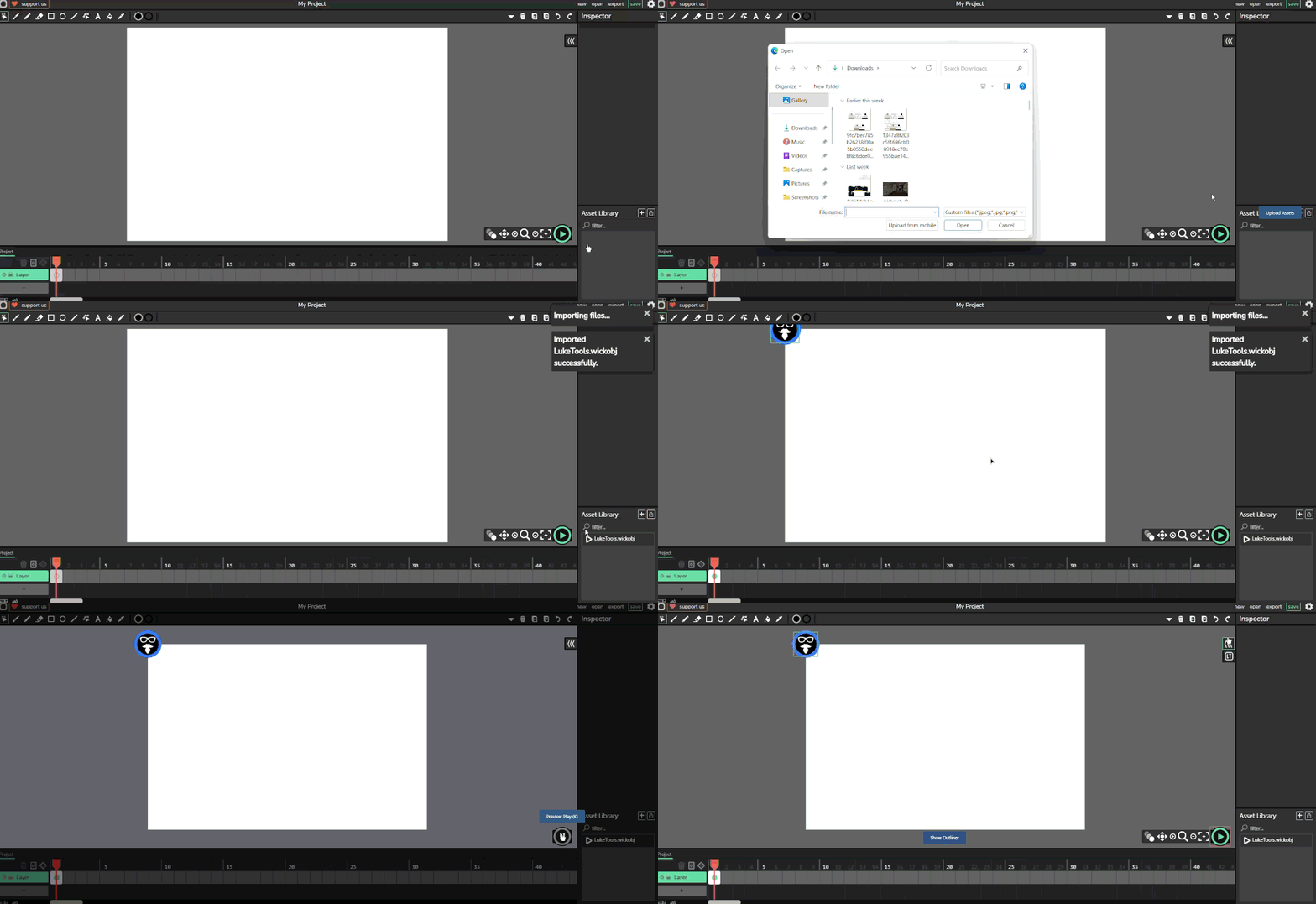
Unzip the folder and load the wickobj via add assets into a Wick project and run it once. A panel will appear with tool categories: Behaviours, Type, Import, Tools, and Sandbox. Each tool when open includes a short description of what it does. Some tools may be in an alpha phase, meaning the interface works but the tool itself may not yet function correctly. Please keep checking back, as I have more to add. I work full time, so updates happen in my spare time.

In the works are a rotoscoping tool and a bone warping tool.

This currently does not work with Candlestick, only Wick Editor 1.19.3.

Enjoy!
2 Likes

How would i use this on an iPad?

I’ve designed it for desktop. But try it and give some feed back!

That was easy, i just uncompacted the file, and put the .wickobj into wick editor, pressed the play button, pressed the asset in the frame and it worked, is that how it works on pc?

1 Like

Yep, I’m doing some videos on how some of the Behaviours, Types, Imports, Tools and the Sandbox works. I’ll post links as I finish them.

Ok, that would be sooooo useful

This is so convenient! I’ve never used luke tools until now when I was scrolling through new posts on the forum, I’m glad I did

1 Like

Cheers FleschkJ, There is more happening in the background. As the tools update they will update in your version. Thanks for bearing with me. Its a different approach but it works. - Videos on how to use them will follow

1 Like

they have auto collision coder. this addon saved my life

1 Like

i downloaded it but i tryed to upload it it didnt work

Hi Idiot_Gravity
It seems Luke Tools only work in the current online version.

bro idk how to use it after I imported it

2 Likes

I am getting to the tutorials slowly - so far I have this one.
https://www.youtube.com/watch?v=kJEfeecOOIg&t=220s

Oh by the way, I made some clip in the Update script and made it a solid, but it replaced all the code I wrote in update, can you make it so that it adds to it if that makes sense? Sorry, English isn’t my first language.

Btw, here is how you do it


If you couldnt make out what happened, first import the OBJ from your files, and play your game/animation on wick editor and stop it, your going to see the Luke Tools under the outliner

How do you do it? kind of having trouble trying, I know you have to make a solid, but it’s not colliding

Hi FleschkJ,

Is everything a clip and given names?

L

1 Like

Yes, it does

Can you screen capture the solid LukeTool and the Side_Runner one as well
L

1 Like

here