
Can’t figure out what I changed that caused this project to freeze on starting it. It used to be a game where you fly a delicate ship and avoid walls. Hope you don’t mind, I’m attaching a Drive download link… https://drive.google.com/file/d/0B43wLWbwHpj6M0lXWV9TUWtyUjQ/view?usp=sharing
Hey!
The project exporter wasn’t exporting one of the wick objects correctly, and was causing one of the scripts to break the json file (basically, all scripts must be encoded somehow so that symbols like quotes and semicolons don’t interfere with the json formatting…this encoding step wasn’t done on the ship, so the single quote in keyIsDown('UP') made the json invalid).
I’m still trying to figure out why the exporter did that, but I was able to fix you project! Here it is: https://drive.google.com/file/d/0B9Q-1Rj8juNmS0ljT0FvekFOMFk/view?usp=sharing
Nice work by the way, definitely reminds me of classic Flash games (Ball Revamped comes to mind). Thanks for usin wick!!
1 Like
Thanks guys, fix works fine!
The movement was simple to program, but I figured it was an easy way to test some things.
Hi all,
I’ve been running a programme using Wick editor but have been using the Legacy editor (Need the html export)
Anyway, one of my student’s project had the same white screen problem.
I have since solved it thanks to Zrispo’s solution above
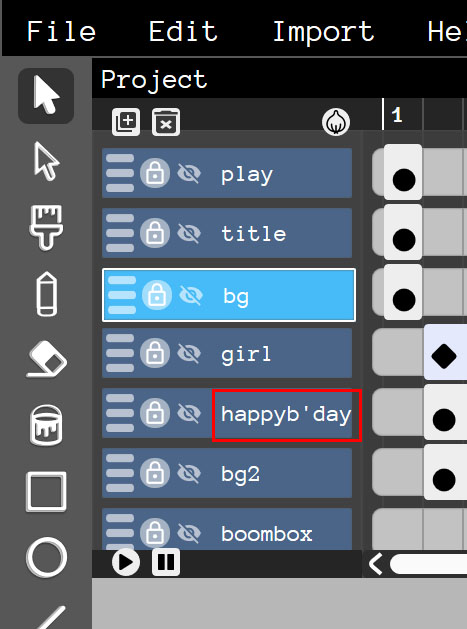
In my student’s case, it seems that by using a comma in the layers cause the white screen error as well. Fixed after i removed the comma.
Just wanted to put this up for anyone else who might face the same issue
1 Like
Nice find!
I’ll definitely be looking out for that.
I’ve had quite a few of those freezes and never knew why.
Glad it is of use to you :)
1 Like
Hello! Idk if this is still active, but it’s been happening to me too whenever i finish playing a clip of my animation. This really upsets me because I lose my progress, because I have to close the window and re-open the software, and redo all my work.

is this the desktop version by chance? the desktop versions are kinda known to be less stable than the browser. (and also, i believe it’s running 1.19.0 while the latest version is 1.19.4 on wickeditor.com/test)
also, if you have steps to reproduce the crash, that’ll be super helpful in helping us get to the bottom of the problem.
there’s a decent chance the crash is not caused by the desktop though, but if/when you come across the crash again could you try opening the console and showing the error message log?
it is the desktop version, also, yes! i will make sure to capture it once again and notify you of it once i do.
also, im figuring that last part out, (i apologize, i am kind of new to wick editor, as of around a couple weeks)
Okay, I caught it. I want to assume it happens after: you draw, you scroll back a few seconds, and play it again. And when you pause the play button, it freezes. That’s what happened for me at least, but Here’s the captured video.
edit: reply limit reached.
that’s a local file path so i won’t be able to see the video - could you upload it to something like google drive or https://catbox.moe/?
1 Like
hmm, that’s odd. are you ok with sending the wick file? and if possible could you press ctrl+shift+J and show what’s in the console?
off the top of my head, i’m thinking it’s either the length of the animation or the audio file being corrupt… but i can’t be too sure.
(i updated your account so you should be able to make new replies)
the audio reaches to about 2,900 frames, whereas the entire project expands to 8680. i press ctrl+shift+J to open console, but i don’t think anything’s popping up unfortunately. i also can’t send the wick file because it’s too big. i apologize for the inconveniences
(i could upload it the same way i did with the video?)
hmm… i can’t get it to crash for some reason.
as for the console thing, it looks like you’re on windows so i don’t know the exact shortcuts, but you might be able to find “developer tools” somewhere. it might be ctrl+shift+I?
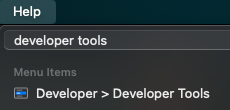
once you’re there, there should be some tabs at the top, and you’ll want to hit console if it isn’t already there.

i am able to do this on the web version, that’s where i can’t get it to crash either.
as for the software, i don’t know if it even has the feature (considering it’s version 1.19)
i want to assume the bug was probably patched in the newer version
Hello again! This same glitch happened to me… again. But on the web version.
Wick Editor 1.19.4
What I was doing was, I continuously kept pressing the left arrow.
I’ve opened the cons
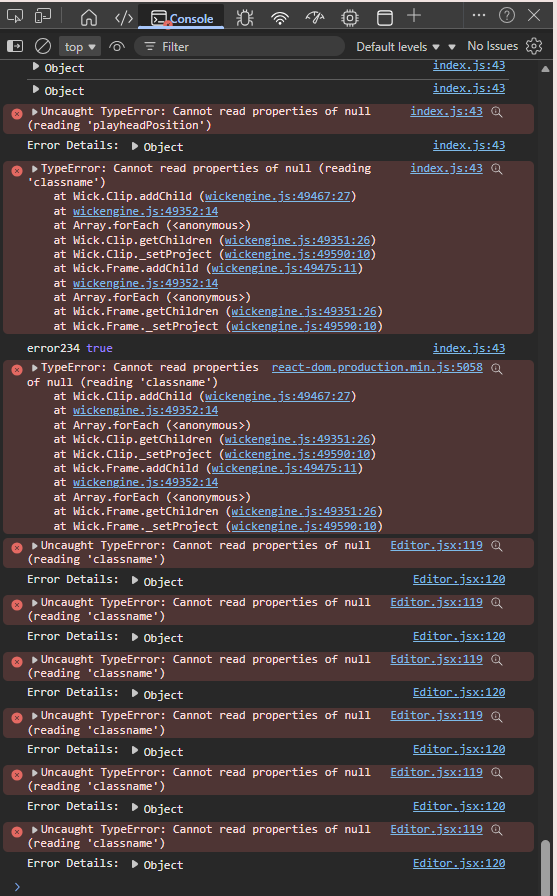
edit: if i recall, i was either spamming ctrl + z or the left arrow. apologies for the bad memory
1 Like
From what the image you sent shows, it seems like Wick didn’t deselect the (now deleted) object. It then just has a stroke trying to delete something that doesn’t exist.
1 Like