
Thanks for looking into it!
Please don’t feel rushed too about it, I can understand how difficult somethings are, so please take your time :]
1 Like
What’s the workaround? Making object show legs is a lot easier when you’re skewing, but I have no idea how to skew tween.
LET’S GO LEAFYYYYYYY
2 Likes
not sure of any workarounds in Wick Editor, but clip skewing can be added to a fork! (I just figured out it out, the leafy gif was a small test) it may be added to Candlestick in the future, but in the meantime, I could add it to my fork if you want
2 Likes
I think some people would want the features to skew, when it is a clip because you might create something complicated as a clip, and want to slant it as a clip, without difficulties, and there have been some people asking for it.
1 Like
yeah, I’ve been wanting it in Wick Editor for a while too :D
1 Like
Is it difficult to code something like that?
1 Like
at least for me, clip skewing has definitely been a challenge… I guess things like that just require a lot of time and poking around
edit: Clip skewing has been deployed to the fork as a test
2 Likes
YEEEEEEESSSS CLIP SKEWING LETS GOOOOOOOOOOOO
I tested it, it works brilliantly, there’s just a tiiiny bug with tweens. Don’t worry, if it’s taken this long to get this feature it’s got to be hard to implement, so you can take your time with this.
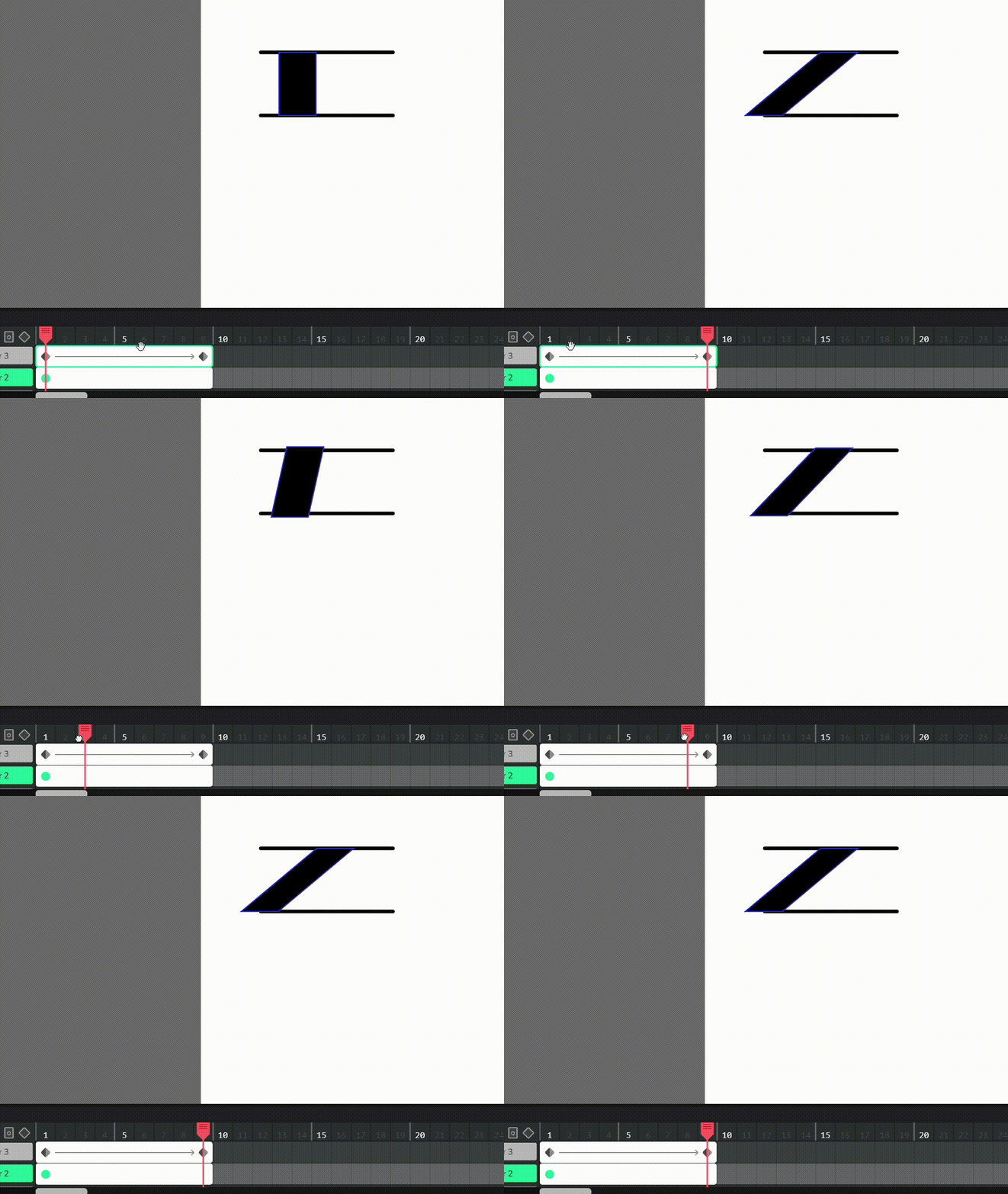
So, the lines are guidelines for along what axis it should be skewed (i think thats the terminology?? idk). The skew should be going in a straight line as a frame-by-frame would, but it’s not.
Also…
THANK YOU SO MUCH FOR ADDING CLIP SKEWING YEEEEEEEEEEEESSS
2 Likes
I see. Well thanks for adding clip skewing 
1 Like
funnily enough, Adobe Animate also has that problem (video: skew tween) (rest in peace adobe animate  )
)
i think part of the problem is that i believe stickmanred implemented the skew with 1 parameter, which is an angle. and while it does give you the desired shape, a linear change in the skew angle does not give a linear-looking tween, since it’s basically a rotation. (it’s like the same reason that rotating a horizontal line makes it taller)
i’m pretty sure there is a solution involving 4 parameters where you have the X and Y offset for the top left/bottom right corners, and then the X and Y offset for the top right/bottom left corners. that way, if you linearly change these corner values and then just calculate skew angle afterward, you can have a proper shear animation (the thing you’re trying to do in the gif).
if we do this though, there is a lot of redundancy. for example you can set these skew values in a way that just increases the width and height of the object, and then the existing width/height parameters make no sense now.
1 Like
actually now that i think about it, i wonder if there’s a way to keep the one-parameter skew, and then for tweens, do some extra math to make the shear animation work.
i realize now that what i just said makes no sense, but if we take this example, the Scale H of this tween below goes from about 6 to 1. if you were to change this value linearly along with skew, it buldges out like we saw before, and the width appears to ease out, despite the tween claiming to be linear.

in theory though, if we just do enough math, we can internally tell the scale to ease out and the skew to ease in, which will actually make the shear look more linear.
if you open this in stickmanred’s fork you can kinda see what i mean. the left one is the original skew tween, and the right is my quick attempt at making it look as linear as possible. skew2-3-2026_10-54-53.wick (2.3 KB)
i think in theory, this is the most unintrusive way to make linear shear tweens. and then of course if you actually want the rotation, we can like, add a checkbox in the tween menu to disable it.
3 Likes
oh boy, I just realized that the way I added tween skews will break previous Wick projects
1 Like
Maybe there could be an option to specify an interpolation behavior? That way, there could be an “original” tween behavior (with skewing not factored in), an Adobe-like tween, and a tween that keeps scaling
having different types of tweens could get confusing though…
2 Likes
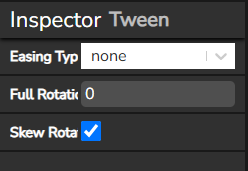
So I pushed a version to the fork that implements this:
- when “Skew Rotate” is toggled off (the default), tweens interpolate like the “vanilla” Wick tweens. It keeps horizontal skews flat and also fixes a rotation bug I think
- when “Skew Rotate” is toggled on, tweens use Adobe-like interpolation
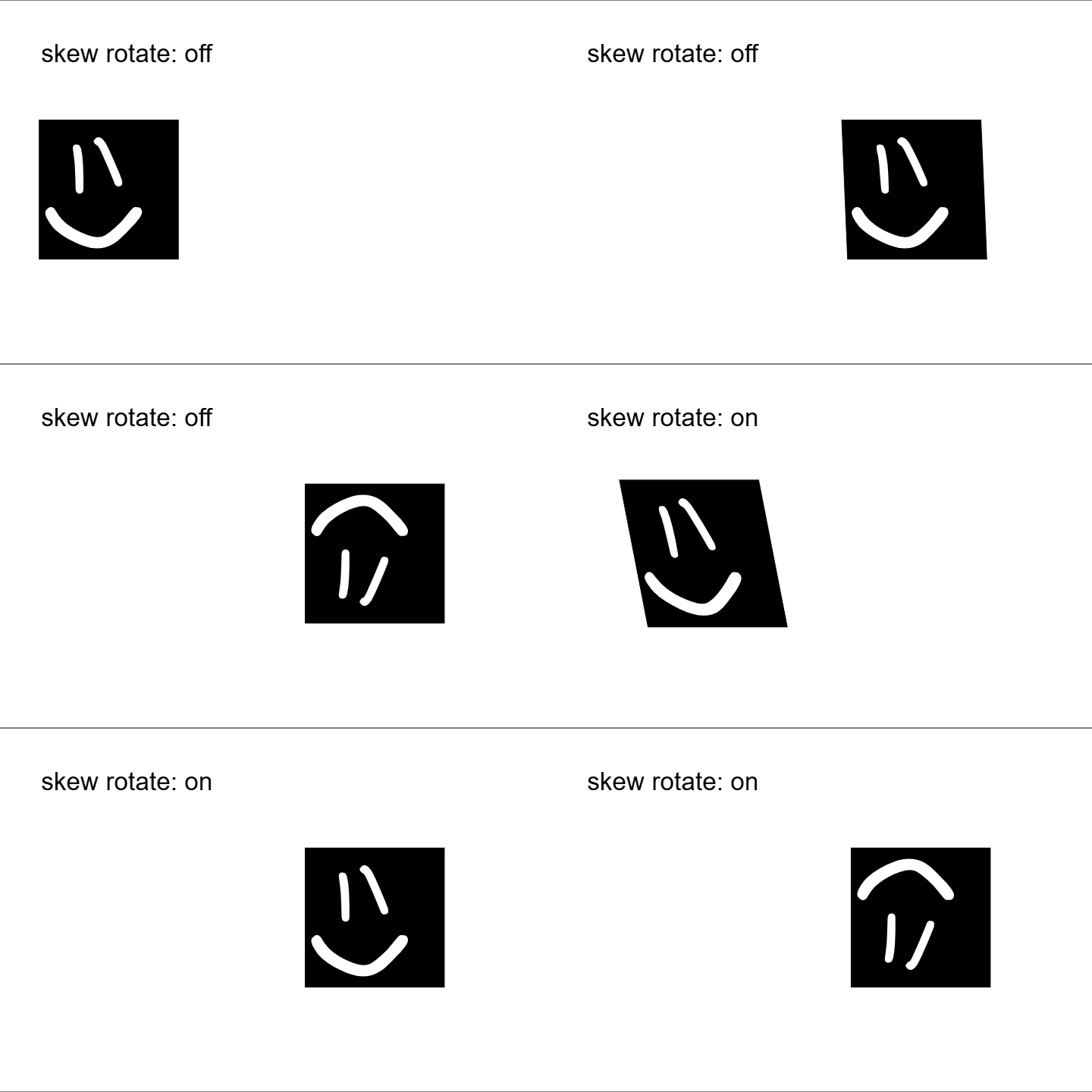
honestly I’m reconsidering adding Adobe-like transforms… paper.js already has a native skew parameter and the different tweens code got quite messy
Edit: oh yeah also I added a clip skew property to the inspector, it was kinda annoying to not be able to change the skew of clips
1 Like
That’s a nice conivence
1 Like
Stickman red can you add like moveble anchor point out side of the object with out moving the object inside the movie clip
1 Like
maybe, i’ll see what I can do!
Other than looking like Flash, I don’t think the adobe classic tweens (yes, even in Animate/Modern Flash they’re considered legacy) are really useful beyond just replicating old Flash animations (e.g. Object Shows, Eddsworld, etc.)
2 Likes
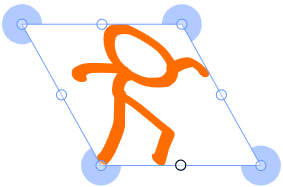
Updates! The gradient tool and prototype skewing has been replaced with more polished versions: color picker gradients and selection box skews. Uhh yeah thats pretty much it. I haven’t updated this fork in a while lol
Feel free to share feedback on the skew selection box!
Andddd I probably should have mentioned these features are on the test page, and the audio scrubbing was moved to the main page
3 Likes