
Unite glitch

Version: 1.19.3 (accessed through web browser)

Problem
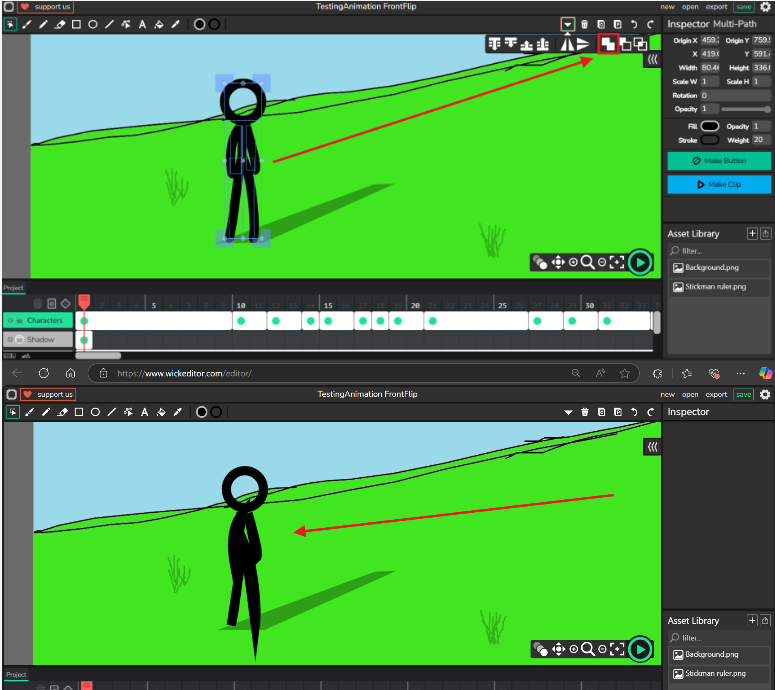
I am animating a stickman animation, I used line tool for the stickman, and then I tried to unite the body parts into a whole but it glitched, it changed the form of the lines.

What I have tried so far
I haven’t tried anything yet, thinking of changing the version but not quite sure how to do it.
Yeah, it’s really buggy for me too. Someone might have a plugin to fix it maybe

1 Like

@Bagastian_Nahason use stickmanred’s editor it might work no idea though just save the project and move it over to stickmanred’s editor but also you shoud use stickmanred’s editor because of its capilates to see more of it go here

Scratch-like cursor

1 Like

The unite thing is not good. A good fix would be running Path.divide(Path2), before running Path.unite(Path2).
And yes, these commands can be used in Wick Editor, but it’ll take some doc-reading to figure it out.

2 Likes

do you have a youtube or something that i can see ur animations? this looks pretty cool

just to give a proper answer to the original question, the boolean tools such as unite do not work the way you’d think with the line or pencil tools. boolean tools (or at least, these ones) are made to work with closed paths (brush, rectangle, ellipse), but the line/pencil tools create open paths. Paper.js treats the open paths as closed ones, and when it performs the boolean operation, you get a weird shape.

your best bet would be to convert the paths into a clip instead of uniting.