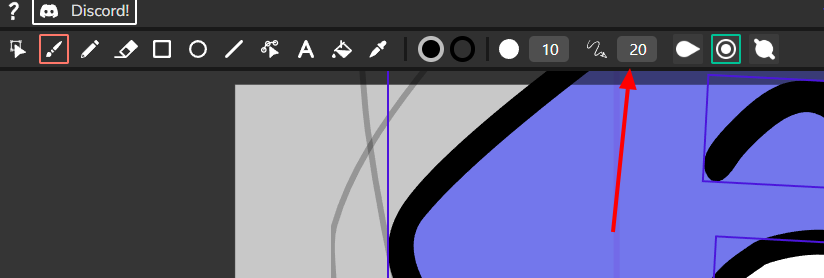
Hello, I’ve been using Wick Editor and had a thought.
Wick Editor is really amazing since it could run on mobile and even the web unlike other similar programs.
But I think that’s what makes the optimization problem even more serious.
In all versions of the program, moving the brush quickly causes the strokes to become angular.
I think this could be solved much more easily. Because it’s a feature already in use in this program.
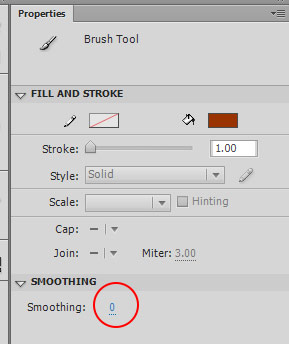

Let me explain by mentioning a feature of the program I think is most similar. I’d like to see ‘smoothing’ feature of Macromedia Flash that allows you to set the smoothness of a brush stroke before drawing it.
To emphasize, not Adobe Animate; they’re slightly different.
As you can see, the lines in Wick are smoothed after drawing. This is very similar to setting the smoothing to 100 in Animate. However, this isn’t enough. Unlike Animate, old Flash could achieve even smoother lines by setting the smoothness to 100. To achieve even smoother lines in Animate now, you have to press the smooth button in Smooth and Straighten Tools, which is a hassle.(These tools are also available in Flash.)
To clarify, I’ll attach a video.
https://www.youtube.com/watch?v=E91tFbl5fW4
Please provide a slider control to control the smoothness of strokes, like this video.
Honestly, the main reason I’m not satisfied with Wick’s default brush and Animate’s Smoothing 100 brush is that the strokes aren’t sharp at the in and out. They never easily create sharp tips. These strokes are amateurish and not really interesting.
Flash has fallen asleep, and for some reason Animate has abandoned this powerful feature and will soon be leaving us. Perhaps your opportunity has arrived! Please consider it!