To make my object show (Article War) even higher-quality, I wanted to add blur, but it seems I don’t know how. Is there a way to make blur? Example of what I want to achievd:
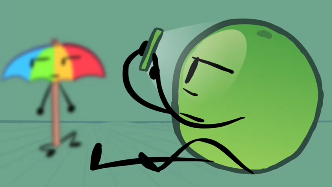
(Characters are not mine)

To make my object show (Article War) even higher-quality, I wanted to add blur, but it seems I don’t know how. Is there a way to make blur? Example of what I want to achievd:
(Characters are not mine)
Wick Editor does not have a native, one-click blur tool. The best methods to simulate blur are using JavaScript code to apply shadowBlur via Paper.js, or by manually placing a low-opacity white shape over an object to create a hazy effect, * Select the object you want to blur.
onLoad tab:this.shadowBlur = 10;this.shadowColor = "white";
10 to increase or decrease the intensity of the blur.