
I am unable to find onion skin anywhere and I find it impossible to animate without it. Please help as soon as possible
Hi there!
You can enable onion skinning by clicking the small onion icon near the timeline:

Enjoy~~
1 Like
your lieing
hi @its_the_box_fox, looks like that post is 3 years ago
and calling someone a lier 3 years later makes no sense 
Anyways, so wick got updated alot in these 3 years, right now,
just press the number 0 key to get onion skinning on
How do I Onion skin in wick 1.19.3
1 Like
Hello, and welcome to the community!
If you want to enable onion skinning, just press the 0 key as @Hamzah_Alani said, or press the icon furthest from the play button (three circles) as shown in the picture:
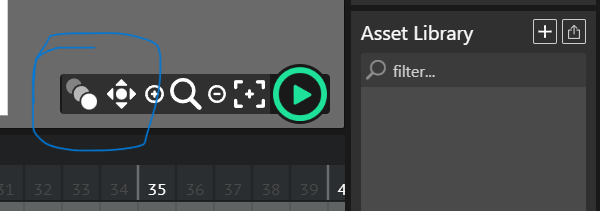
Also, P.S. , you should really be using Candlestick, Wick 1.19.3 is kinda outdated now that Candlestick exists and is being actively worked on (look at the Candlestick 1.0: A New Fork of Wick Editor) forum topic for details). It’s got more features and can do a whole lot that old Wick couldn’t. Hope this helped!!
1 Like